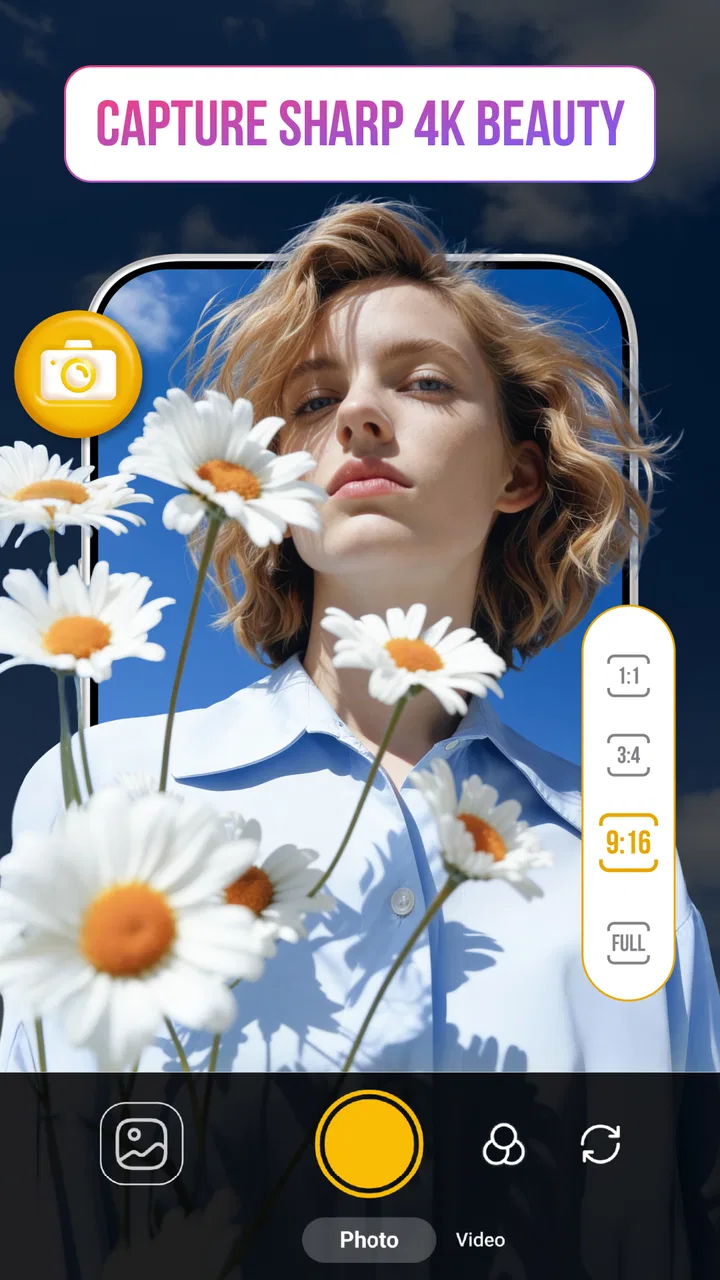
Camera HD: Ultra Zoom
- 4.5
- Rating
- 1.00M
- Installs
- Free
- Price
 Analysis by App-foxy
I tested Camera HD: Ultra Zoom as a photography app on a shared household phone, where the camera needs to be quick enough for everyday moments but still useful when a subject is far away. My first impression was straightforward: this is built around getting more reach from the phone camera, rather than turning photography into a complicated editing hobby. That focus makes it easy to understand, but it also means the value depends heavily on what you expect from zoom.
The app comes from StarApps (OnMobi), is free to install, and is rated for Everyone. Its average score is 4.6 from around 7.5 thousand ratings, while the app has passed one million installs. Those figures suggest that it has found an audience among people looking for a simpler camera alternative, although popularity alone does not guarantee that it will suit every phone or every photographer.
How it works on a shared household phone
In a household, a camera app often has to serve several purposes in the same day. One person may want to photograph a pet sitting across the room, another may need to read a distant sign, and someone else may simply want a sharper shot of a child at a school event. I found the zoom-focused approach useful in those situations because it gives the camera a clear job instead of surrounding the user with creative controls they may never touch.
You May Also Like

 Blood Strike: 2.5 Anniversary
Blood Strike’s Loadouts Turn Every Drop Into a Tactical Gamble
A close look at Blood Strike’s custom loadouts: how fast access to signature weapons reshapes its battle royale rhythm, rewards preparation, and narrows the gap between fights.

 Pandora - Music & Podcasts
Pandora’s Music Is Easy to Start, but Harder to Recover
Pandora’s strength is its low-effort path from a seed to a station. Its weak spot is how much confidence it asks you to place in connection, setup, and quiet recovery.

 8 Ball Pool
 Is Built on Rivalries, Rematches, and Routine
A close look at the rivalries, rematches, shared routines, and unanswered safety questions that turn a quick pool match into a persistent mobile community.

 Samsung Music
’s Quiet Strength Is Playing What You Already Own
Its reach comes less from spectacle than from dependable access to a personal library. That simplicity is both the app’s strongest retention engine and its ceiling.

 AccuWeather: Weather Radar
AccuWeather Review: A Quick, Clear Forecast for Everyday Decisions
For everyday plans, the best forecast is the one you can understand quickly. AccuWeather makes rain timing, radar, and local conditions easy to act on, with a few trade-offs.

 Hill Climb Racing
Why Hill Climb Racing Still Turns Crashes Into One More Run
A tiny car, a bumpy hill and one more upgrade: Hill Climb Racing keeps resurfacing because its simple chaos makes every near-miss feel personal.
More From Our News Desk
View All News


That simplicity is especially helpful when several people use one device. A family member who does not normally explore camera settings can open the app and understand the main idea quickly. The practical benefit is not just speed; it reduces the chance that someone changes an unfamiliar setting and then forgets how to restore it for the next person.
For a realistic example, imagine keeping a household tablet or spare phone near a window. A child notices a bird on a distant roof, an adult wants to capture a view from a balcony, and later someone uses the same device to photograph a small object for a message. The app can be a convenient shared tool in that sequence, but the results will still depend on light, hand movement, and the phone’s own camera hardware. Zoom cannot create detail that the sensor never captured.
I would therefore treat the app as a practical reach enhancer, not as a replacement for a dedicated camera. At modest zoom levels, steady hands and good daylight can make a noticeable difference. In dim rooms or with fast-moving subjects, the enlarged view can also make blur and image noise more obvious. That is an important household expectation to set before everyone assumes that “ultra zoom” means every distant photo will look crisp.
What the first setup should establish
When I prepare a shared device, I prefer to decide in advance who is responsible for the photos and where they should go afterward. The app itself is a camera, not a household filing system, so the useful boundary is between capturing an image and managing it later. That separation prevents confusion when several people take pictures during the same afternoon.
I would also show each user the difference between a normal shot and a heavily enlarged one. This is one of the most useful demonstrations because it teaches the trade-off immediately: more apparent reach can help frame a distant subject, but it can also magnify shake. Asking a child or an older relative to brace the phone against a table, wall, or railing is often more effective than explaining technical camera terms.
The best shared-device habit is to agree on the purpose before increasing the zoom. If the goal is to identify something far away, a tighter view may be worthwhile. If the image will be printed, cropped heavily, or used as an important record, I would take a normal photo as well. Having both versions costs little and protects against disappointment when the enlarged image looks softer than expected.
The app is free, which makes this kind of trial easy. However, in-app purchases range from around ten dollars to around thirty dollars per item. Because of that, I would not let a child or casual household user explore purchase screens without an adult present. The free starting point is attractive, but the family should decide beforehand whether any paid option is appropriate rather than making that decision in the middle of a photo session.
Boundaries matter more than extra zoom
A camera app can be shared without sharing every other part of a person’s digital life. On a family phone, I would make it clear that taking a picture does not automatically mean sending it, posting it, or showing it to everyone nearby. This is particularly important when children photograph friends, visitors, or private parts of the home.
The age rating of Everyone makes the app broadly suitable from a content perspective, but that should not be confused with automatic permission to photograph any subject. Younger users still need simple rules: ask before taking someone’s portrait, do not photograph private documents, and do not point the camera into a neighbor’s space. These are household expectations rather than app features, and they are more valuable than any zoom setting.
I also recommend separating “practice photos” from meaningful family photos. A shared device can fill quickly when everyone tests distant objects, and it becomes harder to find the images that matter. A quick review after a session, deleting obvious mistakes and duplicates, keeps the camera usable without turning photo management into a daily chore.
Another boundary concerns trust. If one person is using the phone for an important event, others should not change the camera setup just to experiment. The app’s appeal is its direct purpose, so preserving a predictable starting point is more useful than allowing every user to customize it differently. If the device is passed around often, a short spoken routine—open the camera, frame the subject, steady the phone, review the result—works better than relying on memory.
Coordinating photos when several people are involved
Zoom photography is often less about the app and more about coordination. When a distant subject is moving, one person can watch the subject while another holds the phone. When photographing a group, the person with the camera should decide where everyone stands before reaching for extra magnification. Otherwise, the frame becomes tight, people move out of view, and the photographer spends more time correcting composition than taking the picture.
I found it helpful to use a two-shot routine. First, take a wider image that records the setting. Then, if the subject is stable and the phone is steady, take a closer version. The wide frame gives context and acts as insurance; the zoomed frame provides detail if the conditions are good. This approach is more dependable than assuming the closest possible view is automatically the best photograph.
For household events, I would assign one person to capture rather than letting everyone interrupt the moment. A single photographer can keep the phone stable and avoid a collection of nearly identical images from different angles. Other family members can suggest subjects, but the person holding the device should have enough time to frame and review each shot.
There is also a useful trade-off between distance and movement. A faraway stationary object, such as a building detail or a sign in daylight, is a sensible test for the app. A running dog, a moving child, or a performer on a dark stage is much harder. In those cases, I would reduce the zoom and prioritize a usable composition over maximum enlargement.
Compared with the usual default camera, this app’s appeal is concentration: it encourages the user to think about reach. The standard camera may be better when someone wants quick automatic processing, familiar controls, or a broad set of shooting modes. Compared with a full manual camera app, Camera HD: Ultra Zoom feels more approachable, but it is less suited to a photographer who wants detailed control over exposure, focus, and file behavior.
Age, trust, and realistic expectations
For adults, the main question is whether the zoom workflow improves a real need. If the phone already produces satisfactory distant photos, installing another camera may add little. If the built-in camera has limited reach or its zoom controls are awkward, this app is easier to justify. I would judge it through actual household tasks rather than through the promise of the largest possible enlargement.
For teenagers, the app can be useful for learning a basic photographic idea: framing is a choice, and getting closer digitally is not the same as moving closer physically. I would encourage them to compare a wider shot with a zoomed shot and notice which one preserves more useful information. That small exercise teaches judgment without requiring a complicated photography course.
For younger children, supervision should focus on privacy and purchases rather than on technical operation. The Everyone rating makes the content accessible, but a child may not understand why photographing a document, a sleeping person, or a stranger can be inappropriate. A shared phone also makes it easy to mistake a playful experiment for a harmless action when the image later appears in the household gallery.
The app runs on Android seven point zero and later, which gives it a broad compatibility range for older household devices. Its current version is one point two, so I would still test it on the exact phone that the family plans to share. Camera behavior can vary between devices because the physical sensor, stabilization, and processing hardware remain important. An app can provide a different interface, but it cannot make every older phone behave like a modern flagship.
Storage and review habits matter too. High-resolution photographs can become inconvenient when several users take repeated tests. I would avoid using the app as a permanent observation tool or leaving it open for long periods simply to watch a distant scene. It makes more sense for deliberate captures: frame the subject, take a few sensible versions, check them, and close the camera when finished.
Where it fits among familiar camera choices
The default camera remains the safest alternative for people who value reliability above experimentation. It is already available, usually matches the phone’s hardware closely, and tends to be the first place users look for portrait, video, or quick sharing options. If your household mainly takes ordinary snapshots at close range, the built-in app may be the better choice.
Camera HD: Ultra Zoom becomes more interesting when distance is the recurring problem. It gives the household a dedicated way to approach faraway subjects without requiring everyone to learn a broad manual interface. That narrow purpose is a strength for casual users, but it is also the reason I would not recommend it as the only camera app for a serious enthusiast.
A manual photography app is preferable when the photographer needs to control exposure in difficult lighting, lock focus deliberately, or build a repeatable professional workflow. A dedicated optical-zoom phone is preferable when distant detail is central to the user’s life, because physical lenses generally handle reach more naturally than digital enlargement. This app makes sense in the middle: more focused than a basic camera experience, but less specialized than equipment designed around long-distance photography.
One non-obvious advantage of that middle position is teachability. A household can use the app to discover whether zoom photography is genuinely useful before spending money on new hardware. The important test is not whether the preview looks dramatically enlarged; it is whether the saved image remains useful after viewing it at full size. I would make that check on a few different subjects before deciding whether the app deserves a permanent place on the device.
My household verdict
After using it with shared-device habits in mind, I see Camera HD: Ultra Zoom as a focused, approachable option for people who regularly need more reach from an Android phone. Its free entry point, Everyone rating, and simple photography purpose make it easy to introduce to a household. StarApps (OnMobi) has kept the concept understandable: open the camera, frame something distant, steady the phone, and judge the result.
I would recommend it to a family that photographs outdoor details, distant signs, pets, scenery, or occasional events and wants a separate zoom-oriented tool. I would also recommend agreeing on privacy rules, purchase boundaries, and a basic photo-cleanup routine before handing it to children or passing the device around. Those steps improve the experience more than chasing the highest enlargement.
I would skip it if your priority is professional manual control, dependable low-light action photography, or the optical quality of a dedicated telephoto camera. I would also skip it if the household only takes close-up snapshots and the existing camera already does everything well. The in-app purchase range means adults should pay attention before approving upgrades, and the phone’s own hardware will remain a major part of the final image.
For my use, the app succeeds when I treat zoom as a framing aid rather than a guarantee of perfect detail. Take a wide backup, brace the phone, use extra reach selectively, and review the saved image instead of trusting the live preview. With those expectations, this free photography app is a practical addition for a shared device, especially when several people need a simple way to bring distant subjects into view.
FAQs for Camera HD: Ultra Zoom
01What features does Camera HD: Ultra Zoom offer?
Camera HD: Ultra Zoom is equipped with advanced features such as high-resolution zoom capabilities, manual focus adjustments, and a variety of shooting modes including panorama and night mode. It also offers real-time filters, professional editing tools, and easy sharing options, making it a comprehensive choice for both amateur and professional photographers.
02Is Camera HD: Ultra Zoom user-friendly for beginners?
Yes, Camera HD: Ultra Zoom is designed with an intuitive interface that is suitable for beginners. It includes tutorials and guides to help users understand various functions. The app also provides automatic settings that allow new users to capture high-quality images without needing to manually adjust every setting.
03Does Camera HD: Ultra Zoom consume a lot of device memory?
Camera HD: Ultra Zoom is optimized to efficiently manage storage space. While high-resolution images can be larger, the app provides options to save in different quality settings. Additionally, users can choose to store photos directly to SD cards or cloud services to manage device memory effectively.
04Is Camera HD: Ultra Zoom compatible with all devices?
Camera HD: Ultra Zoom is compatible with most modern Android and iOS devices. However, certain features may require specific hardware capabilities, such as optical zoom or advanced sensors. It’s recommended to check the app’s compatibility with your specific device model before downloading.
05Are there in-app purchases within Camera HD: Ultra Zoom?
Yes, Camera HD: Ultra Zoom offers in-app purchases. While the basic version is free, users can opt for premium features like additional filters, advanced editing tools, and ad-free usage. These purchases are optional and designed to enhance the overall user experience.
Pros
- High-quality zoom enhances distant shots.
- User-friendly interface for quick access.
- Multiple modes for varied photography styles.
- Seamless integration with social media apps.
- Low battery consumption during use.
Cons
- Limited editing tools available.
- No cloud backup for photos.
- Requires high storage space.
- Occasional lag on older devices.
- Ads in free version can be intrusive.

Camera HD: Ultra Zoom
Gallery